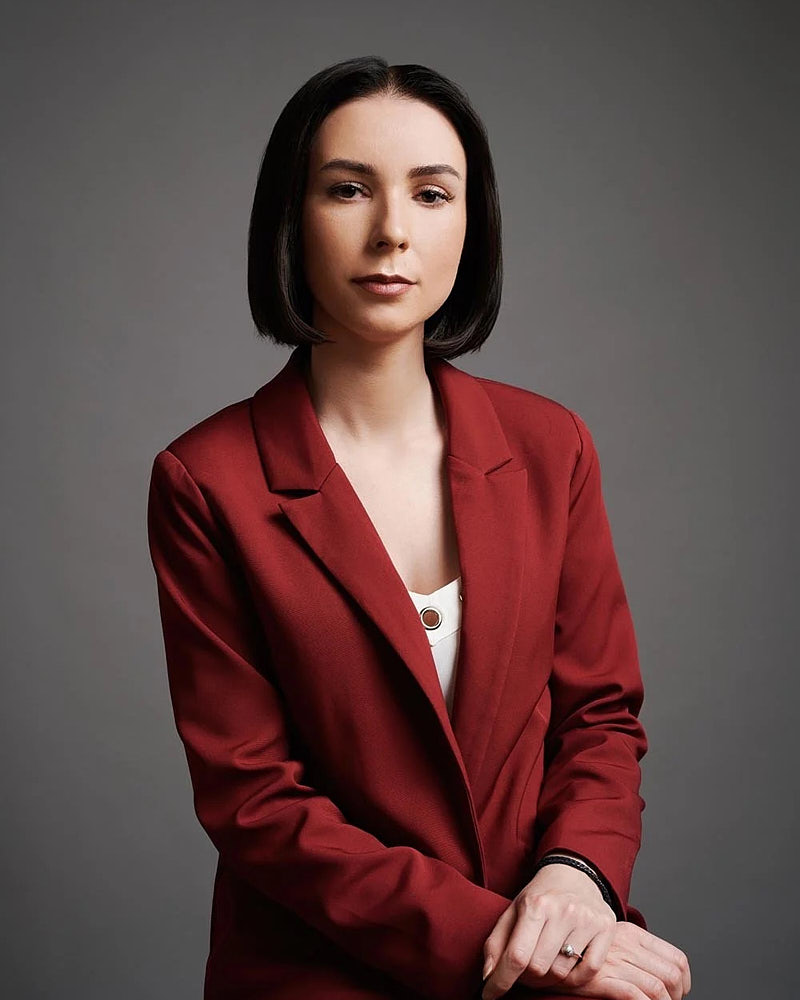
Wear clothes that fit your current work, sit comfortably and keep attention on your face. For LinkedIn, check the collar and neckline in a tight circular crop. For a company team page, also follow its agreed level of formality and background direction. A blazer can help when it fits the role, but it is not a requirement for every professional.
Choose formality from the workplace and the use
Look at your company page, the people you work with and the audience who will see the portrait. A founder meeting customers, a therapist introducing a practice and an employee updating an internal directory may choose different clothes without any of them being wrong.
Start with an outfit you would comfortably wear in a relevant professional setting. If several audiences matter, bring a second complete option within the package’s wardrobe allowance. A jacket over the same base layer can be useful, but it does not replace planning the whole combination.
Avoid buying an unfamiliar outfit solely for the photograph. Clothes that represent you and fit well are usually easier to work with than an impressive item that needs constant adjustment.
Check the neckline, jacket and collar in a close crop
Most of the lower outfit may disappear in a LinkedIn avatar. Inspect the area around the face: collar points, lapels, neckline and the top of any accessories. Sit and turn slightly while checking fit, because clothes can behave differently from their standing mirror view.
| Clothing check | What to look for | Useful preparation |
|---|---|---|
| Jacket | Lapels lie comfortably | Try it seated and unfastened or fastened |
| Shirt collar | No twisting or unwanted gaps | Check with the jacket you will wear |
| Knit or blouse | Neckline stays where you want it | Move and settle before deciding |
| Accessories | Intentional, rather than distracting | Bring a simpler alternative if uncertain |
| Fabric | Wrinkles, lint or pulling | Steam, clean and transport carefully |
Keep full outfits ready even for a close portrait. Wider frames may be part of the session, and comfort matters beyond what appears in the final crop.
Choose colors with the background in mind
There is no single best color for every LinkedIn photograph. Ask about the proposed background and compare how the outfit separates from it. A dark jacket can work against a dark background when the lighting gives suitable separation; a light shirt is not automatically wrong against a pale setting.
Large logos, fine repetitive patterns and very reflective details can compete with the face or complicate a small preview. These are reasons to test alternatives, not universal bans. A color that belongs to your professional style may work better than an unfamiliar “safe” choice.
For the finished avatar, use the LinkedIn circle-crop checklist to review the actual image at small size.
Wear your usual glasses and discuss reflections
If glasses are part of your everyday appearance, bring them. Clean the lenses and let the photographer check reflections while directing the setup. Removing them by default can produce an image that feels less like you.
Do not make last-minute changes to your appearance because of a generic checklist. Keep grooming aligned with how you want to be recognized. If you are planning a haircut or other change, leave enough time to feel comfortable with the result.
Planning example: a founder’s LinkedIn update
Planning example, not a client case. A Los Angeles founder needs a current profile picture for introductions to customers and partners. Their usual workplace clothing is a simple shirt and jacket.
They bring a complete jacket option and a compatible open-collar option, after checking the chosen package’s look allowance. The photographer can compare each against the proposed background. Selection then focuses on recognizability, expression and the circle crop, rather than assuming the more formal outfit is automatically the winner.
Give employees guidance they can follow
For a company shoot, send a short note with the chosen formality, background direction and practical preparation. Ask people to bring clean, well-fitting clothes and state whether outfit changes are included. Avoid conflicting advice such as demanding individuality and identical colors at the same time.
A useful team note might say: “Choose clothing you would wear for an important client meeting. Keep logos minimal, check fit seated, and bring your usual glasses.” Adapt it to the company instead of presenting it as a rule for all industries.
The corporate headshot planning guide covers schedules and organizer responsibilities.
Adapt a short employee clothing note
Sample wording to edit for your company:
Please choose a complete outfit that matches the agreed level of formality. Check it seated and standing, including the collar, jacket and underlayer. Bring your familiar glasses clean. Use the shared background reference when choosing colors. Check the booking instructions for the number of looks and where to arrive.
Add the actual company reference and appointment instructions before sending it. The wardrobe packing checklist helps participants prepare the clothes and care items after making that choice.
Common wardrobe questions
Should I wear a blazer for LinkedIn?
Wear one if it fits your role and feels natural. A well-fitting knit, shirt or blouse can also work. Choose a second option if you need to compare formality and the package allows it.
Should I wear glasses in my headshot?
Usually, if you normally wear them and want that appearance represented. Clean them and discuss reflections during capture. There is no need to remove glasses solely because the photograph is for work.
What is a good background for LinkedIn?
One that lets the face remain clear in the circular thumbnail and fits your work. A quiet studio background or an uncluttered environment can both work; compare real samples rather than relying on one prescribed color.
How should I pose for a LinkedIn headshot?
Start with a comfortable stance or seated position, relaxed shoulders and a natural expression. The business headshot posing guide gives practical starting points.
For a profile update, compare LinkedIn headshot sessions in Los Angeles and send your intended use with the inquiry.